
How To Reduce Clinical Administrative Burden For Specialty Clinics

How To Reduce Clinical Administrative Burden For Specialty Clinics Clinical Administrative Burden is the paperwork and back-office work that pulls your team away from patients. In a specialty clinic, it looks like a medical assistant on hold with an insurer while a patient waits. It also looks like a physician finishing notes at nine at night because the day ran out. Most of it follows patterns, which means most of it can be measured and fixed. Here is where that work hides and what you can do about it, step by step. What Clinical Administrative Burden Looks Like in a Specialty Clinic Specialty care adds layers that general practice often avoids. A spine MRI, a cancer infusion, or a knee procedure usually needs insurer approval before anyone can book it. That approval step is called prior authorization, and it eats a surprising amount of time. The American Medical Association’s 2025 physician survey puts numbers on it. Practices completed about 40 prior authorizations per physician each week. That work took 13 hours of physician and staff time each week. Two in five surveyed physicians employ staff who handle nothing but prior authorization. The Medical Group Management Association saw the same pressure in 2026. In its survey, 40% of group practices reported three or more full-time staff per physician for administrative needs. Most of that work needs no clinical judgment, yet it decides whether a patient gets seen on time. That is why clinical administrative burden is a staffing problem and a revenue problem, not only a morale problem. Why Clinical Administrative Burden Keeps Growing Every insurer has its own rules, forms, and portals. Staff log into a different website for each insurer and retype the same chart details every time. Rules also change without much warning. A form that worked last quarter gets rejected this quarter. Mistakes made at the front desk travel downstream. A wrong insurance ID at check-in becomes a denied claim weeks later. A denied claim is a bill the insurer refuses to pay, and someone must rework it. Knowing what medical claims are and how the claims process works shows where these errors surface. Turnover makes it worse. When a veteran biller leaves, years of knowledge about each insurer walk out with them. Clinical administrative burden compounds because each of these causes feeds the next one. Audit Where Clinical Administrative Burden Lives Most clinics guess where the time goes, and those guesses often miss the real culprit. Ask each team member to log every administrative task for two weeks. The table below gives you a simple worksheet for that exercise. Workflow What to log for two weeks Warning sign Insurance checks before visits Minutes per patient and how often coverage turns out wrong Staff repeat the check on the day of the visit Prior authorization requests Requests started, finished, and reopened The same request returns for missing documents Referral letters and records requests Who writes each one and how long it waits for chart details Letters pile up behind one busy person Denied claims The denial reason and who reworked the claim The same reason shows up week after week Patient calls Call volume and the top three reasons Most calls ask for information you could send automatically Chart notes Minutes each physician spends finishing notes after clinic hours Notes regularly slip into the evening Look for the two or three workflows that consume the most hours. Those are your starting points, and they give you a baseline for your clinical administrative burden. Then track results with revenue cycle analytics, which reports how money moves from visit to payment. Fix the Front Desk First to Lower Clinical Administrative Burden Many denied claims start at check-in. Wrong insurance details, expired coverage, and missing referral numbers all cause trouble later. Eligibility verification means confirming that a patient’s coverage is active and covers the planned service. Run it two or three days ahead so there is time to fix surprises. Front-desk staff also need a working grasp of the types of health insurance plans their patients carry. A plan that requires referrals behaves very differently from one that does not. It also helps when the whole team understands how insurance billing differs from medical billing. Shared vocabulary means fewer handoff mistakes between the front desk and the billing office. Fewer upstream errors mean less rework, and less rework is a dependable way to reduce clinical administrative burden. Automate Prior Authorization to Shrink Clinical Administrative Burden Start by standardizing. Write one checklist for each insurer and procedure so nobody rebuilds a request from scratch. A checklist also shows which clinical detail is missing before the request goes out. Then look at automation. Prior authorization is a strong candidate because the same steps repeat daily. Staff spot the need, gather chart documents, fill the insurer form, submit it, and chase the answer. Each step follows rules, which suits software working under human review. Notove AI builds AI agents for exactly this workflow. Its agent detects the authorization need, pulls documentation from your electronic health record, and prepares the insurer-specific request. Staff review and submit, and the system tracks the status. Notove says this can cut prior authorization workload by up to 80%. A person always approves the request before it goes out. Automating this one workflow can remove a large slice of clinical administrative burden in a specialty clinic. Share the Load So Physicians Carry Less Clinical Administrative Burden Physicians should not be the default owner of every task. Map each task to the lowest role that can do it safely. A trained coordinator can own referrals, and a scribe or dictation tool can draft notes. A scribe is someone who documents the visit as it happens. The physician then reviews and signs instead of typing from zero. Standard templates for common visit types also cut typing. Keep them short and built around what the insurer and the next clinician actually need. Finally, delete tasks that add no clinical or financial
What Is Revenue Cycle Analytics and Why Specialty Clinics Should Track It

What Is Revenue Cycle Analytics and Why Specialty Clinics Should Track It Revenue Cycle Analytics is the process of turning billing and claims data into clear financial answers. It shows where money slows down, where it leaks, and where it never arrives. Most clinic managers already feel the symptoms. Payments arrive late. Staff rework the same claims twice. Month-end totals look lower than the schedule suggested. Feeling the problem is not the same as measuring it. This guide explains what Revenue Cycle Analytics means and which numbers matter most. It also shows why specialty clinics gain the most from it. What Is Revenue Cycle Analytics? The revenue cycle covers every step between a patient booking a visit and your clinic collecting full payment. That includes scheduling, insurance checks, authorizations, coding, claim submission, and patient billing. Revenue Cycle Analytics measures how well each step performs. It gathers data from every stage and looks for patterns. Those patterns point to the root cause of lost or delayed revenue. Here is the difference between a basic report and real analytics. A report says you had 40 denied claims last month. Analytics says 28 of them came from one payer, for one procedure, because approvals were missing. The second answer is something your team can act on this week. It also helps to separate analytics from revenue cycle management, often shortened to RCM. Management is the daily work of billing, following up, and collecting. Analytics is the measurement layer on top. It tells your team what to fix first. Where the Data Behind Revenue Cycle Analytics Comes From Strong analytics depends on connecting data that usually sits in separate systems. Most clinics pull from five places: Scheduling and registration records show whether patient details were captured correctly before the visit. Eligibility checks confirm active coverage. A failed check often predicts a denial weeks later. Authorization records show which procedures needed approval and whether it arrived on time. Claims data tracks every submission, rejection, and resubmission. Remittance advice is the payer’s explanation of what it paid and why it adjusted the rest. Payer mix shapes how you read this data. Every payer follows its own rules, and those rules change by plan type. Our guide to types of health insurance plans for clinic billing staff covers those differences. It also helps to understand how insurance billing differs from medical billing. The two follow different rules, so they need separate tracking. Finally, each claim moves through several stages. Learn what medical claims are and how the claims process works to see why every stage needs a metric. Why Specialty Clinics Should Track Revenue Cycle Analytics Specialty clinics carry higher stakes on every claim. One MRI, infusion, or cardiac procedure can cost thousands of dollars. A single denial hurts far more than a missed routine visit. Authorization adds more pressure. Radiology clinics need approval before most advanced imaging. Orthopedic practices need approval for surgeries and injections. Oncology practices need approval for costly drugs and treatments. Each missing approval can become a denied claim. Revenue Cycle Analytics also protects your team’s time. Staff who chase denials cannot handle new work. Rework quietly eats hours that billing and front desk teams could use elsewhere. Billing problems shape how patients feel, too. A surprise bill after a visit damages trust quickly. Our article on patient experience in healthcare explains why this now counts as a business metric. Revenue Cycle Analytics shows where that billing friction starts. Finally, data stops guesswork. Teams can agree on the biggest problem before they spend money on it. The Revenue Cycle Analytics Metrics Worth Tracking First Start with a small set of numbers. Five metrics cover most problems. The table below shows how to calculate each one, a common target, and what a miss usually means. Metric How to calculate it Common target What a miss usually points to Clean claim rate Claims accepted on first submission divided by total claims submitted 95% or higher Registration errors, coding mistakes, or missing approvals Denial rate Denied claims divided by total claims billed Under 5% is strong; 5% to 10% is typical Weak front-end checks or payer rule changes Days in A/R Total outstanding receivables divided by average daily charges Under 35 days Slow follow-up or a pile of unresolved denials Net collection rate Payments collected divided by the amount you were allowed to collect 95% or higher Write-offs from unappealed denials or missed filing deadlines Authorization denial share Authorization denials divided by all denials No fixed target; aim to shrink it Approvals missing, late, or incomplete before the procedure The last row matters most for specialty clinics. Generic billing reports rarely track it. Yet it often explains the biggest share of lost revenue. Targets vary by specialty, payer contract, and clinic size. Treat them as starting points. Your own trend line matters more than any industry average. Here is a quick example. Picture an orthopedic clinic that bills 500 claims in a month. Sixty come back denied, which is a 12% denial rate. That number alone feels vague. Now split those 60 denials by reason. Thirty-five trace back to missing or late approvals. That is 58% of all denials, tied to one fixable step. Without the split, the clinic might hire another biller. With it, the clinic fixes its authorization process instead. The data changed the decision, not just the report. These numbers also move together. A low clean claim rate raises denials. More denials stretch days in A/R. Longer waits pull down net collection. Read them as a group. How Revenue Cycle Analytics Exposes Prior Authorization Problems Authorization is where many specialty denials begin. Standard reports often bury it inside a generic denial code. Revenue Cycle Analytics fixes that by tagging each denial to its cause. Split denials by reason, payer, and procedure. If authorization denials cluster around one payer, you know exactly where the process breaks. That gap is what Notove AI is built to close. Its agents detect which procedures need authorization
Types of Health Insurance Plans Explained for Clinic Billing Staff

Types of Health Insurance Plans Explained for Clinic Billing Staff Health Insurance Plans decide whether a claim gets paid, delayed, or denied before the patient even arrives. Most billing teams learn this the hard way, usually after a denial lands on their desk. The insurance card rarely tells the full story. One payer can sell several products under the same logo. Each product sets different rules about which doctors a patient can see and when. This guide breaks down the main Health Insurance Plans your team will meet, in plain language. Each section focuses on what changes in your daily work, from scheduling to claim submission. Three Terms That Shape How Health Insurance Plans Work Every one of the Health Insurance Plans below uses the same three building blocks. A network is the group of providers that signed a contract with the payer. A referral is a primary care doctor’s written recommendation to see a specialist. An authorization is the payer’s approval for a specific service before it happens. Teams often mix up referrals and authorizations, and the claim gets denied. They are separate steps, and a plan can require one, both, or neither. Even an approved authorization does not guarantee payment. Eligibility, coding, and documentation still get checked when the claim arrives. If the terminology still feels blurry, read what insurance billing is and how it differs from medical billing. The Four Core Health Insurance Plans Your Team Sees Daily These four Health Insurance Plans appear constantly in commercial coverage. Each one handles specialist access and out-of-network care differently. HMO: Health Maintenance Organization An HMO is built around a primary care provider, often called a PCP. The patient picks one PCP who coordinates all care. Seeing a specialist usually requires a referral from that PCP. Care outside the network is generally not covered, except in emergencies. For billing staff, the referral is the item to chase. Without it, the claim may be denied or the patient may owe the full charge. PPO: Preferred Provider Organization A PPO gives patients the most freedom. They can see any in-network provider without choosing a PCP. Referrals are generally not required for specialists. Out-of-network care is often covered, but the patient pays a higher share. Your focus shifts from referral tracking to network checking. Confirm the provider is in-network on the date of service, because the cost changes if not. EPO: Exclusive Provider Organization An EPO sits between an HMO and a PPO. Patients usually skip the PCP and referrals. However, the plan generally pays only for in-network care, with emergencies as the usual exception. This catches patients off guard. They hear “no referral needed” and assume any specialist is fine. Tell patients at scheduling that the provider must be in the network. POS: Point of Service A POS plan blends HMO and PPO rules. The patient picks a PCP and usually needs referrals for specialists. Unlike an HMO, the plan may cover out-of-network care at a higher cost. Treat a POS patient like an HMO patient first. Collect the referral, then check network status. How High Deductible Health Insurance Plans Change Patient Payments A high deductible health plan, or HDHP, is not a separate network type. An HMO, PPO, EPO, or POS can all be built as an HDHP. What changes is the money. The patient pays the full allowed amount until the deductible is met. The allowed amount is the rate your payer contract permits. Many HDHP members also hold a health savings account, or HSA. An HSA is a tax-advantaged account used for medical costs. Expect more patient balances early in the year. Collect estimated responsibility at the visit when your payer contract allows it. Medicare Advantage and Medicaid Health Insurance Plans Medicare Advantage delivers Medicare benefits through private insurers. Most of these plans operate as HMOs or PPOs, so the rules above apply. The patient presents the plan’s card instead of the red, white, and blue Medicare card. Original Medicare rarely requires prior authorization. Medicare Advantage plans often do. Many state Medicaid programs also run through managed care organizations that behave like HMOs. Confirm your state’s rules before assuming either way. How Different Health Insurance Plans Handle the Same Specialist Visit Here is how one scheduling request plays out across six coverage situations. Use it in new hire training to test whether the rules have stuck. Coverage situation What the patient does What usually happens HMO with no referral on file Books a specialist directly The claim may deny, or the patient may owe the full charge PPO with an in-network specialist Books a specialist directly No referral is needed, and the claim pays at in-network rates EPO with an out-of-network specialist Books a specialist directly The plan generally denies the claim, except for emergencies POS with a referral and an out-of-network specialist Follows the PCP referral The plan may pay, but the patient owes a higher share HDHP with the deductible not yet met Books a visit in January The patient pays the allowed amount until the deductible is met Medicare Advantage HMO with an MRI ordered Schedules the scan The plan may require authorization before the scan happens Verification Habits That Work Across Health Insurance Plans Verification is where every plan rule becomes a task. These five checks apply to all Health Insurance Plans: Confirm active coverage on the date of service. A card can be valid but inactive. Ask for the exact plan type. Products from one payer follow different rules. Check referral and authorization needs for the specific procedure. Rules attach to services, not just to plans. Verify network status for the provider and the facility. A mismatch can raise the patient’s cost. Ask whether a second plan exists and which pays first. The wrong billing order causes rejections. Document every answer with the date, the representative’s name, and a call reference number. That record protects your clinic when a payer disputes what was said. Clean verification protects the claim downstream. See what medical
What Is Insurance Billing and How It Differs From Medical Billing
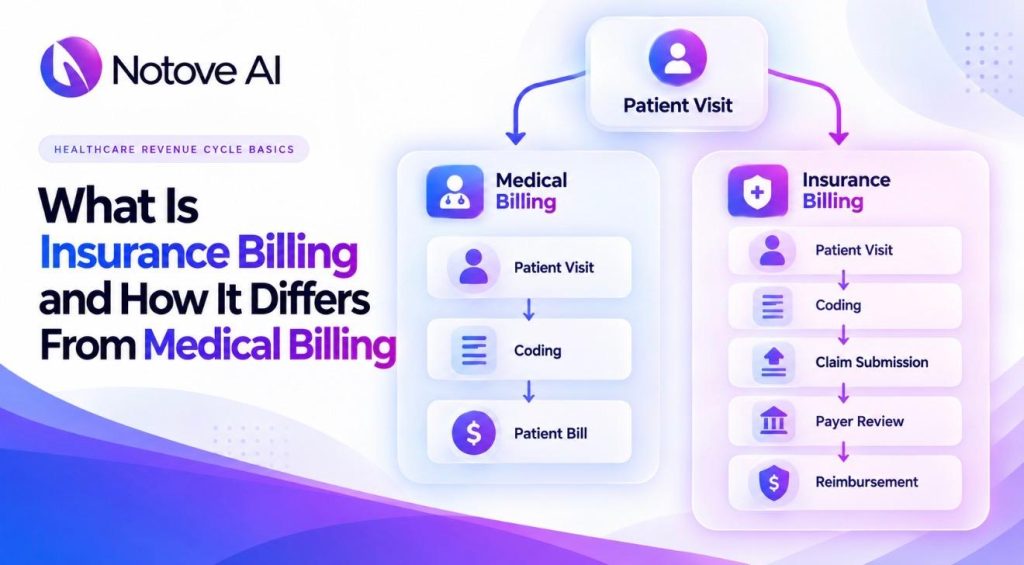
What Is Insurance Billing and How It Differs From Medical Billing Insurance billing is the part of a clinic’s revenue cycle where claims go to payers for payment. Medical billing is the bigger process that surrounds it. Many clinics use the two terms as if they mean the same thing. They don’t, and the gap causes real confusion at the front desk. A patient asks why they got a bill after insurance paid. A new hire asks who owns a rejected claim. Both questions trace back to the same mix-up. This guide explains insurance billing in plain terms. It also shows how it differs from medical billing, one step at a time. What Is Insurance Billing? Insurance billing is the work of sending claims to a patient’s insurer and following them until they’re paid. The clinic submits a claim after the visit. The payer then checks coverage, medical necessity, and contract rules. After that, it approves, adjusts, or denies the claim. Insurance billing ends when the payment is posted and any leftover balance is routed to the right place. Professional claims go on the CMS-1500 form or its electronic version, the 837P. Facility claims use the UB-04 form instead. Most outpatient specialty clinics send professional claims. Two Meanings of Insurance Billing The phrase has a second meaning outside healthcare. Insurance companies also bill their own customers for premiums. That is insurance billing from the insurer’s side. This article uses the provider meaning, since that is how clinics use it. What Is Medical Billing? Medical billing covers the full path from patient check-in to final payment. It includes insurance billing, but it doesn’t stop there. It also covers registration, eligibility checks, and patient statements. Payment posting, collections, and reporting belong to it as well. Many teams split the work into two halves. Front-end tasks happen before and during the visit. Back-end tasks begin once the claim leaves the building. A smooth cycle needs both halves working together. Medical coding feeds the process. Coders turn the visit note into standard codes. Billers then use those codes to build the claim. Our guide to medical claims and how the claims process actually works covers that step in detail. Insurance Billing vs Medical Billing: The Real Difference Think of medical billing as the whole journey. Insurance billing is one leg of that trip. It’s also the leg that most affects cash flow. A simple example shows how the money splits. Say a specialist charges $200 for a visit. The deductible is met, and coinsurance is 20 percent. Money step Amount Which process owns it Clinic charge for the visit $200 Medical billing Payer’s allowed amount $150 Insurance billing Contractual write-off $50 Insurance billing Insurer pays 80 percent of the allowed amount $120 Insurance billing Patient pays 20 percent coinsurance $30 Medical billing Insurance billing handles the $120 payment and the $50 adjustment. Medical billing handles the $30 patient balance and everything around it. Both bills come from one visit, but they follow different rules. Who You Deal With Insurance billing means working with payers, portals, and clearinghouses. Medical billing adds patients, who need clear statements and payment options. The tone changes too. Payer calls are about codes and policy. Patient calls are about worry and cost. Insurance Billing Terms That Get Mixed Up A lot of the confusion comes from vocabulary. This table sorts the terms and shows who receives each document. Term What it means Who receives it Claim A request for payment sent after a visit The payer Explanation of benefits (EOB) The payer’s summary of how it processed a claim The patient Remittance advice (ERA) Payment details and adjustment codes The clinic Statement A bill for the patient’s remaining balance The patient Clean claim A claim with no errors that would block payment The payer Allowed amount The most the payer will recognize for a service The clinic and patient The EOB causes the most trouble. It looks like a bill, but it isn’t one. The ERA is for the clinic, not the patient. Teach front-desk staff to explain that difference. The Insurance Billing Process Step by Step Most clean claims follow the same path. Here is how insurance billing usually runs in a clinic. Verify eligibility and benefits. Confirm active coverage, copays, and deductibles before the visit. Check prior authorization. Some imaging, surgical, and specialty services need payer approval first. Capture charges and codes. The provider documents the visit, and a coder assigns codes. Scrub and submit the claim. Software or staff catch errors before the payer does. Track the claim. Watch for payer questions, rejections, and long delays. Post payment and work denials. Match the remittance to the claim, then appeal or correct what’s wrong. Each step protects the next one. Skipping one rarely saves time. A skipped eligibility check shows up as a denial weeks later. The first two steps happen before the patient sees the doctor. That’s why front-desk staff shape insurance billing more than most people realize. Who Handles Insurance Billing in a Clinic In a small clinic, one person may do all of this. In a larger group, the work splits across roles. Front-desk staff handle registration and eligibility. Coders assign the codes. Billers build and track claims. Authorization specialists manage payer approvals. A practice manager watches the numbers. The split matters because each handoff can lose information. Clear definitions of insurance billing and medical billing keep those handoffs clean. Job titles add to the confusion. One clinic may post for an insurance biller. Another may call the same role a medical biller. The tasks overlap, but the scope can differ. Read the job description, not just the title. Why Insurance Billing Errors Start at the Front Desk Many denied claims trace back to the front end. Common denial reasons include missing authorization, ineligible patients, coding errors, duplicates, and late filing. Many of them are preventable with better front-end checks. A clear denials management strategy turns those patterns into fixes. Track denial reasons by
What Are Medical Claims and How the Claims Process Actually Works

What Are Medical Claims and How the Claims Process Actually Works Medical claims are the formal payment requests a clinic sends to an insurer after care is delivered. Every visit, scan, and procedure becomes a claim before any money arrives. That claim decides how fast your practice gets paid. Most teams treat claims as a back-office chore. In reality, the process starts before the patient walks in. Eligibility checks, prior authorizations, and clean documentation all shape the outcome. This guide explains how the process works from check-in to payment. It is written for clinic owners, practice managers, and billing teams who want the full picture. What Are Medical Claims? A medical claim is an itemized bill that a provider submits to a payer. It lists the services delivered, the diagnosis behind them, and the charge for each one. The payer reviews it and decides what to pay. Pharmacy claims are separate. They track prescriptions dispensed rather than clinical services. Most medical claims use one of two formats. Professional services, such as office visits, go on the CMS-1500, which becomes an 837P file electronically. Facility services go on the UB-04, which becomes an 837I file. Using the wrong form is a common reason for rejection. What Information Do Medical Claims Contain? Each claim describes the patient, the provider, the care, and the price. Standard code sets keep that description consistent across payers. Code set What it describes Example ICD-10 The diagnosis Why the patient needed care CPT Procedures and services An office visit or an MRI HCPCS Supplies, equipment, and some services A knee brace NDC Drugs An injectable medication Claims also carry the provider’s NPI, the payer name, dates of service, and total charges. Payers usually see the data in two parts. The header holds patient details and the primary diagnosis. The detail lines list each service with its date, code, and charge. One wrong digit in any field can stall payment. How the Medical Claims Process Works, Step by Step The medical claims process has seven stages. Each stage hands its data to the next one, so early mistakes travel far. Registration. Staff collect demographics and insurance details before the visit. Eligibility and authorization. The team confirms active coverage, benefits, and any prior authorization requirement. Care and documentation. The clinician records the visit, and the notes must support every billed service. Coding and charge entry. A coder converts the notes into codes and attaches a charge to each line. Scrubbing and submission. A clearinghouse checks the claim, fixes formatting, and tailors it to each payer. Some high-volume payers, like Medicare, accept claims directly. Adjudication. The payer checks coverage, medical necessity, and coding. Then it accepts, rejects, or denies the claim. Payment and patient billing. The payer sends a remittance advice. Staff post the payment and bill the patient for the balance. Four parties touch every claim, and each one owns a different handoff. Party Role Handoff Provider or biller Registers the patient, codes the visit, submits the claim Sends the claim to a clearinghouse Clearinghouse Scrubs and formats the claim Forwards it to the payer Payer Adjudicates the claim and pays Sends remittance advice to the provider Patient Covers the deductible, copay, and coinsurance Pays the remaining balance Patients feel that last step most. The insurer also sends the patient an explanation of benefits. It is not a bill. It shows what was billed, what the plan allowed, and what the patient owes. Confusing statements erode trust, and patient experience in healthcare is now a real business metric. Why the Front End Decides the Fate of Medical Claims Many claim problems start at registration, not at the payer. Eligibility checks confirm active coverage, copays, deductibles, and prior authorization rules. A typo in a member ID causes a rejection. A missing authorization can cause a denial that cannot be fixed afterward. Fixing an error before submission is far cheaper than fixing it after a denial. Specialty clinics feel this pressure most. Radiology, orthopedic, cardiology, and oncology procedures often need approval before the visit. Staff bounce between the EHR, payer portals, faxes, and phone calls. One missing clinical detail sends a request backward. That is the gap Notove AI was built for. Its agents gather documentation and prepare prior authorization requests. Staff then review and submit them. Fewer gaps at the front end means cleaner medical claims at the back end. Common Mistakes That Slow Down Medical Claims Most delays trace back to a short list of avoidable errors. Using the wrong claim form for the service type Missing or invalid provider NPI numbers Duplicate submissions sent before the processing window closes Filing after the payer’s deadline Wrong modifiers, or bundled services billed separately A claim scrubber catches many of these before the payer sees the claim. Rejected vs Denied Medical Claims The two words sound alike but mean different things. A rejection happens before the payer reviews the claim. A denial happens after. Status When it happens Where you see it Usual next step Rejected Before adjudication, from data or format errors 277CA claim acknowledgment Correct the error and resubmit Denied After adjudication, when the payer refuses payment 835 remittance advice Review the reason code, then correct or appeal Billing staff can usually fix rejections. Denials often need clinical or coding input. Rejected claims still count against filing deadlines, so speed matters. Medicare allows 12 months, while commercial payers range from 90 to 365 days. Average denial rates typically sit between 5 and 10 percent. A strong denials management strategy turns those reason codes into a repeatable fix. How Long Do Medical Claims Take to Get Paid? Speed depends on accuracy and how the claim is submitted. Electronic claims often process in 7 to 14 days. Paper claims can take 30 to 45 days. Medicare’s benchmark is paying 95 percent of clean claims within 30 days. A clean claim passes every check on the first try. Errors push it back into the queue and add weeks. Where Medical Claims
What Is Patient Experience in Healthcare and Why It’s Now a Business Metric

What Is Patient Experience in Healthcare and Why It’s Now a Business Metric Patient experience is every interaction someone has with your practice, from the first call to the final bill. It covers the front desk, the exam room, the insurance approval, and the follow-up message. Many practice owners still treat it as a soft topic. That view is getting expensive. Payers, regulators, and patients now judge practices on how care feels, not only on how it is delivered. Those judgments affect payments, referrals, and whether someone books a second visit. This article explains what patient experience means, how it ties to revenue, and what to do about it. What Is Patient Experience in Healthcare? The Agency for Healthcare Research and Quality treats patient experience as a core part of care quality. It includes timely appointments, easy access to information, and clear communication with clinicians and staff. Agency for Healthcare Research and Quality The Beryl Institute frames it as everything patients encounter, shaped by an organization’s culture, across their whole care journey. One NHS description says clinical excellence is the what of care, and experience is the how. Sano GeneticsSano Genetics The experience starts before the patient walks in. A confusing booking page counts. So does a payer delay that pushes a scan back three weeks. Patients rarely separate your clinic from the paperwork around it. Patient Experience vs. Patient Satisfaction People use these terms as if they mean the same thing. They do not. Experience describes what happened and how it happened from the patient’s view. Satisfaction reflects personal expectations and opinions about the care received. nih Two patients can get identical care and rate it differently. That is a satisfaction gap. Experience data is more useful because it points to events you can fix. For a practice owner, this distinction matters. Satisfaction scores tell you how patients felt. Patient experience data tells you why. You cannot fix a feeling, but you can fix a wait time. Why Patient Experience Is Now a Business Metric Three forces moved patient experience from the marketing folder to the finance dashboard. Payment Programs Measure It Medicare already links money to survey results. Under Hospital Value-Based Purchasing, CMS withholds 2% of Medicare payments and returns part of it based on performance. HCAHPS survey results feed that calculation. Qualtrics Outpatient groups have a parallel tool: CAHPS for MIPS, an optional quality measure for MIPS groups. Even clinics outside these programs feel the pressure. Patients read reviews before they book. CMS Patients Leave When Access Is Hard A Talker Research survey for Klara found 49% would leave over not feeling heard or understood. Another 41% cited feeling rushed. Access matters just as much. Callers said they wait about 8.5 minutes on hold and would hang up near ten. KPAXKPAX Each abandoned call is a new patient you never meet. For a specialty clinic, one patient often means repeat visits, procedures, and referrals. Losing that person at the phone stage costs far more than one appointment. Margins Tend to Follow Experience A Deloitte analysis of HCAHPS scores found a striking gap. Hospitals rated excellent averaged a 4.7% net margin. Lower-rated peers averaged 1.8%. That is a correlation, not proof of cause. Still, a gap of nearly three points is hard to ignore. Keonahealth How Back-Office Work Shapes Patient Experience Patients never see your billing software or payer portals. They feel the results. Take prior authorization. In the 2025 AMA survey, 95% of physicians said it delays necessary care. Also, 79% said patients abandon treatment because of it. That task looks administrative. To the patient, it is a delayed scan and another anxious phone call. American Medical AssociationAmerican Medical Association The table below maps what patients notice against what your team is actually doing. What the patient notices What is happening behind the scenes Where it costs the practice “My MRI keeps getting pushed back” Staff chase approvals across payer portals, faxes, and phone calls Empty slots, treatment drop-off, staff overtime “Nobody explained why this was denied” Rejected claims sit in a rework queue Slower payment, confused patients, more calls “The bill doesn’t match what I was told” Registration, coding, and billing steps that do not line up Write-offs and collection costs “The doctor barely looked up from the screen” Clinicians type notes and complete forms during the visit Rushed visits, burnout, weaker documentation Each row has a fix that starts behind the scenes. A clear denials management strategy keeps patients from receiving surprise balances. The healthcare revenue cycle, from registration to payment, touches patients at every step. Better notes reduce rework later, and clinical documentation improvement gives teams a structured way to get there. If you wonder where automation fits, start with what healthcare AI means for specialty clinics. This is why patient experience is no longer only a front-desk concern. It is an operations concern, and operations belong to the owner. Every hour your staff saves on paperwork is an hour available for patients. How to Measure Patient Experience as a Business Metric Surveys alone will not get you there. NRC Health argues that return on experience has to be measured beyond the survey. Patient experience data only earns a seat in the budget meeting when it sits next to revenue data. NRC Health DrChrono suggests tying each experience problem to a revenue channel such as retention, referrals, or reimbursement. A practical starting set looks like this: DrChrono Time to first appointment for new patients Call abandonment rate at the front desk Prior authorization turnaround time Denial rate and days in accounts receivable No-show and cancellation rate Patient retention and referral volume Survey top-box scores, meaning ratings of 9 or 10 Pick two or three and review them monthly. Give them the same attention you give collections. Ways to Improve Patient Experience Without Adding Headcount Start with the slowest handoff. For many specialty clinics, that is prior authorization. The 2024 AMA survey found staff complete about 39 authorizations weekly, spending roughly 13 hours on
Healthcare AI Explained: What It Actually Means for Specialty Clinics

Healthcare AI Explained: What It Actually Means for Specialty Clinics Healthcare AI gets mentioned in almost every clinic meeting now, yet the room rarely agrees on what it means. One person pictures a chatbot answering patient questions. Another pictures software reading an X-ray and flagging a tumor. A third just means anything with the word AI stamped on the box. That confusion matters more in specialty clinics than almost anywhere else in medicine. Radiology, oncology, orthopedic, and cardiology practices carry heavier documentation and authorization demands than a typical primary care office. Before a clinic spends time or budget on it, it helps to know exactly what Healthcare AI covers and where it actually earns its keep. What Healthcare AI Actually Means Healthcare AI is the umbrella term for every artificial intelligence tool used anywhere inside a health system. That includes tools a patient interacts with directly and tools that work entirely behind the scenes. It covers scheduling assistants, billing checks, documentation helpers, and diagnostic imaging software alike. The phrase does not point to one product or one function. Healthcare AI is a category, not a single tool. A clinic asking to buy Healthcare AI is a little like asking to buy software in general. The real question is which slice of that category actually fits a specific problem. Healthcare AI Is Not One Single Tool Vendors often blur these categories together in a sales pitch. Understanding the real types of Healthcare AI makes it easier to see past the noise. The table below breaks down the main categories and where specialty clinics typically encounter each one. Type of Healthcare AI What It Actually Does Common Use in Specialty Clinics Machine learning Learns patterns from past data to predict outcomes Flagging claims that are likely to be denied Natural language processing Reads and organizes text from notes and records Pulling clinical details for authorization requests Generative AI Drafts new text based on existing information Writing referral letters or visit summaries Predictive AI Forecasts future events from historical trends Estimating no-show risk or staffing needs Agentic AI Carries out multi-step tasks with limited human input Gathering documents and submitting authorization requests Computer vision Analyzes images to detect visual patterns Reviewing imaging studies in radiology Most clinics interact with two or three of these types at once, often without realizing it. A single prior authorization workflow might use natural language processing to read a chart, then hand the assembled request to an agentic AI system for submission. Clinical Healthcare AI vs Administrative Healthcare AI Healthcare AI splits into two broad lanes, and the difference shapes how fast a clinic can actually adopt it. Clinical Healthcare AI touches diagnosis and treatment decisions directly. Software that reads a mammogram or suggests a drug dosage sits in this lane. It usually needs FDA clearance, the federal review process confirming a medical tool is safe and effective, before any clinic can use it. That process can take years. Administrative Healthcare AI works outside the clinical decision itself. It handles scheduling, documentation, billing, and prior authorization instead. Because it never touches a diagnosis, it moves through adoption far faster. That speed gap is a big reason administrative Healthcare AI is already running inside specialty clinics well ahead of most clinical tools. Where Healthcare AI Shows Up First in Specialty Clinics Administrative Healthcare AI tends to land first in the parts of a clinic already under the most strain. Prior authorization sits near the top of that list. The average physician handles dozens of authorization requests every week, and each one eats staff hours before a payer even responds. Healthcare AI can gather documentation and prepare that request automatically, shortening the wait between an order and an approval. Denials sit close behind prior authorization on that same list. A clinic reworking the same denials management problems every month often finds Healthcare AI useful for catching errors before a claim goes out at all. Weak patient access is another common entry point, since scheduling and intake generate huge amounts of repetitive work. Documentation is a third. Strong clinical documentation improvement habits make every downstream Healthcare AI tool more accurate, since these systems are only as reliable as the notes they read. How Healthcare AI Differs Across Specialties Healthcare AI rarely behaves the same way twice across different specialties. Radiology clinics tend to see it first in image review, where computer vision tools flag patterns for a radiologist to confirm. Oncology practices often meet Healthcare AI through authorization work, since treatment timelines leave little room for a stalled approval. Orthopedic groups lean on it for imaging-heavy referrals, where missing documentation is a common cause of delay. Cardiology practices frequently use it to manage recurring procedure authorizations, since many patients return for repeat testing. The shared thread across every specialty is documentation. Healthcare AI performs best where clinical detail is dense and repetitive, which is exactly the environment specialty clinics operate in every day. What Healthcare AI Cannot Replace Every Healthcare AI tool worth using still depends on a human reviewing its output before anything gets submitted or acted on. Administrative Healthcare AI can gather documents and draft a request, but staff still confirm that request is accurate and complete. Clinical Healthcare AI can flag a pattern on an image, but a physician still makes the diagnosis. That review layer is not a limitation to work around. It is the reason Healthcare AI can be trusted with sensitive clinical and financial information in the first place. Clinics that treat Healthcare AI as a full replacement for judgment tend to run into accuracy problems quickly. Clinics that treat it as a way to remove repetitive work tend to see the strongest results. How to Evaluate a Healthcare AI Tool Before Adopting It Not every Healthcare AI product on the market deserves a place in a specialty clinic. A few questions separate a genuinely useful tool from an overhyped one. Does it work inside the clinic’s existing EHR, the electronic health record system
What Is Denials Management and Why Every Specialty Clinic Needs a Strategy

What Is Denials Management and Why Every Specialty Clinic Needs a Strategy Denials management is the structured process clinics use to find, fix, and prevent denied insurance claims. Every specialty clinic loses some revenue to denials sooner or later. The real question is whether that loss gets tracked and reversed, or quietly written off. Most practices assume denials management only means prior authorization problems. That assumption misses a much bigger picture. Denials also come from coding errors, eligibility gaps, and thin documentation. A real denials management strategy has to cover all of it, not just one slice. What Is Denials Management, In Plain Terms? Denials management means identifying why a claim was denied and correcting the underlying problem. It covers two jobs at once. The first job is working existing denials so the clinic gets paid. The second job is preventing the same denial from happening again. Both halves matter equally in a strong denials management program. A clinic that only reworks denials without addressing root causes stays stuck in the same cycle. Denials management done well turns denial data into a feedback loop for the whole practice. It is not a single task. It is an ongoing discipline. Why Denials Management Deserves Its Own Strategy Many clinics treat denials as a billing task handled whenever staff find time. That approach almost guarantees denials pile up faster than anyone can clear them. Denials management works best as a defined strategy with clear ownership. Someone needs to track denial volume by reason, payer, and department. Someone also needs authority to change upstream processes when patterns emerge. Without that structure, denials management becomes reactive instead of preventive. A defined strategy also gives leadership real visibility into where revenue leaks. That visibility is often missing in smaller specialty practices, where one or two staff members juggle billing alongside everything else. The Main Categories of Denials Every Specialty Clinic Should Track Denials management works better once a clinic understands the shape of its own denials. Not every denial shares the same root cause or the same fix. Grouping denials into categories makes patterns easier to spot early. The table below breaks down the categories that show up most in specialty clinics, along with where each one starts. Denial Category Typical CARC Code Where It Usually Starts Eligibility CO-27, CO-31 Front desk, during check-in Authorization CO-197 Scheduling, before the visit Coding CO-11, CO-50 Coding team, after the visit Documentation CO-16 Provider notes, during the visit Duplicate claim CO-18 Billing team, at submission Timely filing CO-29 Billing team, after submission Notice how few of these categories actually start inside the billing department. Most denials trace back to a step earlier in the process. That is exactly why denials management cannot live in one department alone. It has to reach into scheduling, front desk, and clinical documentation too. How Denials Management Fits Into the Broader Healthcare Revenue Cycle Denials management is one stage within a much longer process. It sits downstream from registration, prior authorization, documentation, and coding. Problems at any of those earlier stages eventually surface as a denial. This guide to the healthcare revenue cycle walks through every step that feeds into denials management. It covers everything from the first phone call to final payment. Understanding that full chain helps clinics see why denials management cannot be fixed in isolation. Fixing the symptom without fixing the source just delays the next denial. The Real Cost of Weak Denials Management for Specialty Clinics Specialty clinics carry heavier documentation and authorization requirements than most primary care practices. That makes denials management even more important for radiology, oncology, orthopedic, and cardiology practices. A single denied imaging claim can represent hundreds of dollars in lost revenue. Multiply that across a busy week and the number grows fast. Staff time spent reworking denials also pulls attention away from patient care. Weak denials management does not just cost money. It adds stress to administrative teams that are already stretched thin. Over a full year, the gap between strong and weak denials management can equal a meaningful share of total collections. Signs Your Denials Management Process Needs Attention A few warning signs tend to show up before denials management fully breaks down. Denial rates climb month after month without a clear explanation The same denial reason keeps appearing across different patients Staff rework denials manually with no shared tracking system Appeals get submitted close to the payer deadline, or missed entirely No one owns denials management as their actual job Any one of these signs is worth investigating on its own. Several appearing together usually means denials management needs a real strategy, not another quick fix. Building a Denials Management Strategy That Actually Works A strong denials management strategy usually follows the same basic structure. First, every denial gets logged with its reason code attached. Second, denials get grouped by category, payer, and root cause. Third, staff decide which denials are worth appealing and which are not. Fourth, recoverable denials get corrected and resubmitted quickly. Fifth, the clinic feeds what it learns back into earlier steps. That last step is what separates denials management from simple claim cleanup. Prevention has to come from the same data used for appeals, not a separate process nobody has time for. Clear clinical notes make appeals stronger and prevent future denials from the same cause. This overview of clinical documentation improvement explains why documentation quality carries so much weight in denials management outcomes. Where Prior Authorization Fits Into Denials Management Prior authorization denials deserve their own mention inside denials management. They are avoidable in most cases, yet they remain common across specialty clinics. A missing authorization can turn a medically necessary procedure into an unpaid claim. Staff often spend hours confirming requirements payer by payer. Weak intake processes make this worse before a claim ever reaches billing. This breakdown of patient access in healthcare covers why front-end gaps like this keep showing up in specialty practices. Strengthening that front-end step is one of the fastest
What Is the Healthcare Revenue Cycle? Breaking Down Every Step From Registration to Payment

What Is the Healthcare Revenue Cycle? Breaking Down Every Step From Registration to Payment The healthcare revenue cycle is the full financial journey a patient’s visit takes, from the first phone call to the final payment. Every clinic runs on this cycle whether staff call it that or not. Understanding each stage helps practice managers spot exactly where revenue gets stuck. What Is the Healthcare Revenue Cycle, In Plain Terms? The healthcare revenue cycle covers everything between scheduling a patient and collecting the last dollar owed. It includes registration, insurance verification, documentation, coding, billing, and collections. Each stage feeds directly into the next one. A mistake early in the healthcare revenue cycle rarely stays contained to that single step. It tends to surface weeks later as a denied claim or an unpaid balance. That is why practice managers treat the healthcare revenue cycle as one connected system, not separate departments working in isolation. Why the Healthcare Revenue Cycle Matters More Than Most Clinics Realize Cash flow for any clinic depends entirely on how well the healthcare revenue cycle runs. Payroll, rent, and supply orders all wait on claims getting paid on time. A slow or broken healthcare revenue cycle rarely fails all at once. It leaks money quietly, through small errors that pile up over months. Specialty clinics feel this pressure even more, since their claims often carry stricter documentation and authorization requirements. Every step described below exists to close one of those leak points before it becomes a habit. Step 1: Pre-Registration and Scheduling The healthcare revenue cycle technically begins before the patient ever walks in. Pre-registration gathers demographic details and insurance information ahead of the visit. Staff confirm the appointment type and flag anything that might need special handling. This early step sets the tone for the rest of the healthcare revenue cycle. A clinic that skips proper pre-registration usually pays for it later, in denials. Step 2: Patient Registration and Insurance Verification Registration confirms the patient’s identity, address, and coverage details on the day of the visit. Front desk staff verify eligibility directly with the payer before the appointment starts. This step decides whether a claim has any real chance of getting paid at all. Weak patient access processes are one of the most common failure points in the healthcare revenue cycle. Clinics struggling here often see the same problems repeat every single week. For a closer look at where this stage tends to break down, this breakdown of patient access in healthcare explains why it matters so much for specialty practices. Step 3: Prior Authorization Some procedures require payer approval before they can even be scheduled. Prior authorization confirms the payer agrees the service is medically necessary. Missing this step is one of the leading causes of denied claims across every specialty. Staff must track authorization status by payer, since rules vary widely between plans. This stage of the healthcare revenue cycle often eats the most administrative hours in a clinic’s week. Step 4: Clinical Documentation During the Visit Every claim in the healthcare revenue cycle depends on what the provider actually documents. Vague or incomplete notes make it harder for coders to assign accurate codes later. Clear documentation also protects the clinic if a payer later questions medical necessity. This is where clinical documentation improvement work makes the biggest difference to revenue. This guide to clinical documentation improvement explains why it carries so much weight for specialty clinics. Step 5: Medical Coding Coding translates the documented visit into standardized codes payers can actually process. A coder assigns CPT and ICD-10 codes, along with any required modifiers. Even a single wrong digit can send a clean claim straight into denial. Accuracy at this stage of the healthcare revenue cycle protects both revenue and compliance. This explanation of medical coding walks through why precision here affects clinic revenue so directly. Step 6: Charge Capture and Claim Creation Charge capture makes sure every billable service actually gets recorded, not just documented. Skipped charges quietly drain revenue that a clinic never even realizes it lost. Once charges are confirmed, the claim is assembled in the correct payer format. Most claims today move through this step electronically rather than on paper. This is one of the quieter stages of the healthcare revenue cycle, but it carries real weight. Step 7: Claim Submission The completed claim is sent to the payer, often through a clearinghouse first. The clearinghouse scrubs the claim for obvious errors before it ever reaches the payer. A clean claim rate is one of the clearest signals of revenue cycle health. Clinics that submit clean claims consistently see faster payment across the board. This step connects directly to the broader billing process covered in this guide to medical billing for new practice managers. Step 8: Payer Adjudication and Remittance Once a payer receives the claim, adjudication decides what actually gets paid. The payer may approve the claim fully, adjust it, or deny it outright. Remittance advice explains exactly how that decision was reached, line by line. Reading these remittances carefully helps staff catch patterns before they repeat again. This stage of the healthcare revenue cycle is largely out of the clinic’s direct control. Step 9: Payment Posting Approved payments are posted to the patient’s account and matched against the claim. Electronic remittance advice speeds this step up considerably compared to paper statements. Accurate posting keeps the clinic’s financial records honest and easy to audit. Errors here can make a healthy healthcare revenue cycle look worse than it actually is. Step 10: Denial Management and Appeals Not every claim gets paid on the first attempt, even with careful preparation. Denial management means reviewing the reason code and deciding whether to appeal it. Some denials are simple fixes, like a typo or a missing modifier. Others require a full appeal packet with supporting documentation attached to it. Clinics that work denials quickly recover far more revenue than those that let them sit unresolved. Step 11: Patient Billing and Collections
What Is Clinical Documentation Improvement (CDI) and Why It Matters for Specialty Clinics

What Is Clinical Documentation Improvement (CDI) and Why It Matters for Specialty Clinics Clinical Documentation Improvement is the process of making a patient’s medical record as accurate and complete as possible. It sits quietly behind every claim a specialty clinic submits. When documentation is vague, the whole revenue cycle feels it. For practice managers already juggling denials and staffing gaps, this quiet process deserves real attention. Clinical Documentation Improvement in plain English: what it actually means Clinical Documentation Improvement, often shortened to CDI, reviews clinical notes for clarity and specificity. A CDI specialist or CDI-trained clinician looks for gaps between what happened and what got written down. The goal is not more paperwork. The goal is documentation that matches the actual care delivered. CDI started in hospitals back in the 1980s. It grew alongside Medicare’s severity-based payment system. Since then, it has spread into outpatient settings, including specialty practices, imaging centers, and behavioral health clinics. Clinical Documentation Improvement is often confused with medical coding. The two are related but different. CDI improves the note itself before a coder ever touches it. Coding is the next step in that chain. This guide to medical coding accuracy breaks down how it shapes clinic revenue. Why specialty clinics feel documentation gaps more than most Specialty clinics operate differently than primary care offices. Visits are shorter, procedures are more complex, and payer rules are stricter. Clinical Documentation Improvement matters more here because the margin for error is smaller. An orthopedic note might miss which knee was treated. A cardiology note might skip a key comorbidity. A radiology order might lack a clear reason for the scan. Each gap looks small on its own. Together, they add up to real revenue loss. Referrals also add complexity. A patient might see three specialists before landing in your clinic. Every handoff creates a chance for information to get lost. Clinical Documentation Improvement helps close those gaps before they turn into denials. Where documentation breaks down across specialties Documentation risk looks different depending on the specialty. The table below shows where clinics typically lose the most ground. Specialty High-Risk Documentation Area Potential Impact Orthopedics Laterality and injury mechanism Denials for the wrong side or unclear cause Cardiology Severity of illness and comorbidities Downcoded visits and lost risk-adjustment revenue Oncology Staging detail and treatment intent Delayed authorizations for high-cost therapies Radiology Medical necessity for imaging orders Prior authorization denials before the scan happens Behavioral Health Time-based notes and symptom severity Session downcoding and audit exposure Primary Care Chronic condition capture at every visit Missed risk scores and lower reimbursement These patterns repeat across most specialty settings. Recognizing them early is the first step toward stronger Clinical Documentation Improvement practices. How Clinical Documentation Improvement connects to coding, billing, and revenue Clinical Documentation Improvement does not happen in isolation. It feeds directly into coding, and coding feeds directly into billing. A gap in the note becomes a gap in the code. That gap then becomes a denied or delayed claim. Picture a patient visit for chronic pain management. The provider documents symptoms but leaves out severity and duration. The coder cannot assign the most accurate diagnosis code. The claim goes out anyway, and the payer questions medical necessity. This is why Clinical Documentation Improvement and medical billing are so closely linked. Weak documentation upstream creates rework downstream. For a fuller picture of how claims move, explore this beginner’s guide to medical billing. It walks through each stage of that process. The real cost of weak documentation in specialty clinics Revenue leakage from poor documentation is often invisible. Clinics rarely see a line item labeled documentation loss. Instead, they see rising denial rates and slower payments. Undercoding is one hidden cost. A visit gets billed at a lower level than the care actually delivered. Overcoding is the opposite risk, and it carries its own compliance danger. Staff time is another cost that gets overlooked. Every denied claim needs research, correction, and resubmission. That work pulls staff away from new patients and new revenue. Clinical Documentation Improvement addresses these problems at the source. Instead of fixing claims after denial, it strengthens the note before submission. That shift alone can meaningfully change a clinic’s financial trajectory. Where Clinical Documentation Improvement fits in the daily clinic workflow Clinical Documentation Improvement touches nearly every part of clinic operations. It starts before the visit and continues long after the patient leaves. Patient access sets the stage first. Accurate scheduling, insurance verification, and intake all shape what the provider documents later. Clinics struggling with patient access in healthcare often see downstream documentation problems too. The EHR system plays a role as well. Templates, prompts, and structured fields either support good documentation or work against it. Clinics that understand how their EHR system shapes daily workflow tend to catch documentation gaps earlier. After the visit, coding and billing take over. Clinical Documentation Improvement is the thread that connects all of these steps together. What a strong Clinical Documentation Improvement program looks like A strong Clinical Documentation Improvement program starts with clear expectations. Providers need to know exactly what payers require for each specialty. Vague guidance leads to vague notes. Templates help, but only when built correctly. Structured fields should prompt for severity, laterality, and medical necessity. They should never encourage copy-paste habits or cloned notes. Regular feedback matters just as much as templates. Providers should see specific examples of gaps in their own notes. That feedback loop turns Clinical Documentation Improvement into an ongoing habit, not a one-time project. Smaller specialty clinics rarely have room for a dedicated CDI department. Even so, the same principles apply at a smaller scale. A weekly review of denied claims can reveal documentation patterns quickly. How automation supports Clinical Documentation Improvement without replacing clinical judgment Technology is changing how Clinical Documentation Improvement gets done. AI tools can now flag missing details in real time, right inside the note. For example, a system might notice a diagnosis without a stated severity. It can