

EHR Integration is quietly becoming the biggest lever specialty clinics have for cutting prior authorization delays. If you have ever watched a prior auth request sit in limbo for days while a patient waits for an MRI or a specialty medication, you already know the cost. The paperwork itself is not the real problem. The real problem is how many hands, systems, and re-typed fields a single request has to pass through before a payer even looks at it.
This article breaks down why prior authorization feels so slow, what EHR Integration actually means in this context, and how it speeds up the process at almost every step.
Why prior authorization feels slow (and where the time actually goes)
Prior authorization, often shortened to PA, is a payer requirement before certain care can proceed. It typically applies to medications, imaging, procedures, and durable medical equipment.
The typical PA timeline looks simple on paper. Clinical documentation gets gathered, payer rules get checked, forms get completed, requests get submitted, and then the back and forth begins.
In reality, most of the delay hides inside that back and forth. Missing or incorrect data forces staff to dig through charts again. Fax machines and payer portals fragment the process even further.
Every payer has different requirements, which means duplicate entry becomes the norm rather than the exception. Staff end up typing the same clinical details into three or four different systems.
These delays are not just inconvenient. They push back patient care, drive clinician burnout, and quietly leak revenue through denials and rework. Anyone who has read about how AI can reduce physician burnout caused by administrative paperwork knows this cycle is well documented across specialties.
This is exactly where EHR Integration earns its place. It reduces what many revenue cycle leaders call administrative latency, which is the lag between a clinical decision and the payer actually receiving what it needs.
What EHR Integration means in a prior authorization workflow
EHR Integration is often misunderstood as simply having two systems that can technically talk to each other. That is not enough on its own.
Real EHR Integration means three things happening together. Data moves in both directions. The workflow itself is embedded inside the clinician and staff experience. Status visibility is available without logging into a separate portal.
There are different levels of EHR Integration worth knowing. Basic integration allows attachments or exports between systems. Intermediate integration offers single sign on access to a payer or vendor portal.
Advanced EHR Integration goes further. It embeds rules and automatically captures data directly inside the clinical workflow. Optimized integration closes the loop entirely and adds analytics on top.
You may also hear terms like ePA, short for electronic prior authorization, or interoperability, which is a broader term than workflow integration. RPA, or robotic process automation, is not the same thing as true EHR Integration either.
The goal behind all of this is simple. Reduce clicks, remove re-keying, ensure nothing is missing, and get payers a faster, cleaner response.
How EHR Integration speeds up prior authorization
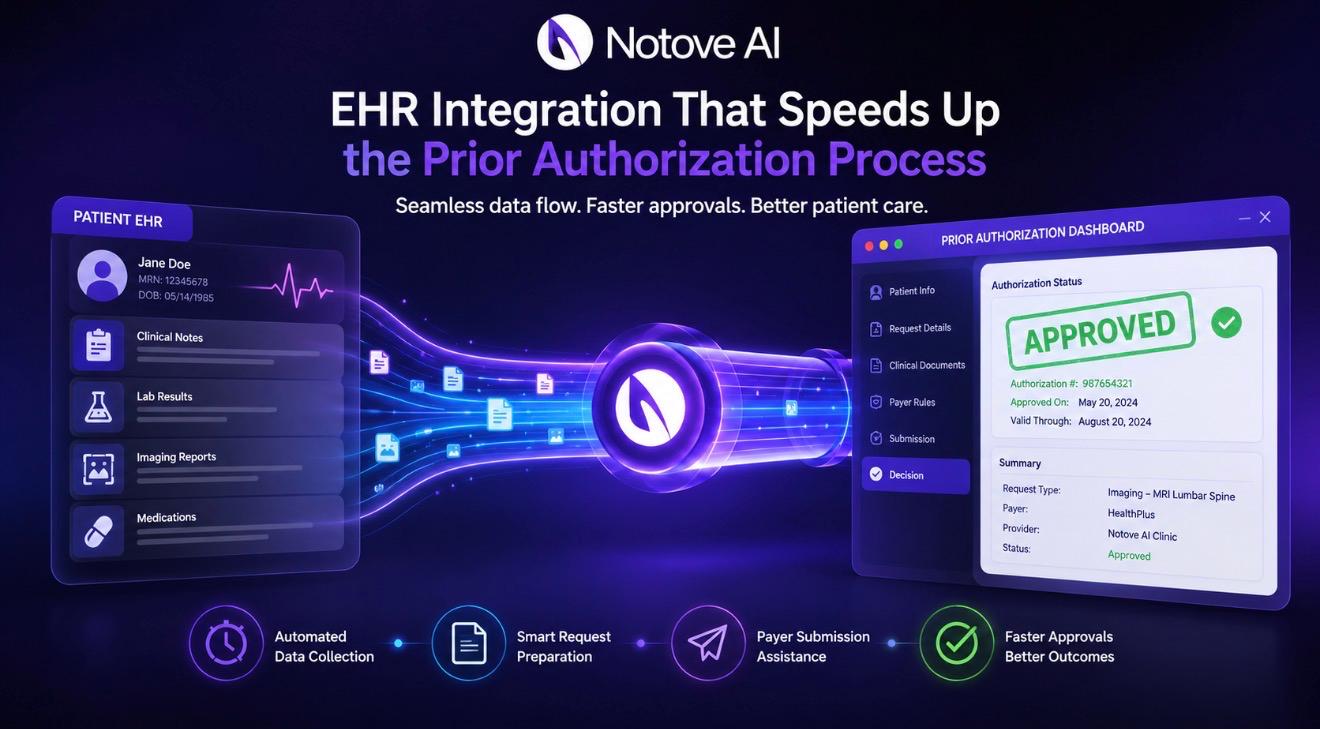
Here are seven concrete ways EHR Integration shortens the prior authorization timeline.
First, it auto-populates PA requests using existing patient data. Demographics, coverage details, NPI numbers, diagnosis codes, medication history, labs, and imaging results all pull in automatically.
Second, it runs real-time eligibility and benefit checks. Staff can confirm coverage and whether a PA is even necessary before anyone submits anything.
Third, payer rules surface directly inside the EHR. Medical policies, step therapy requirements, and quantity limits become visible before submission, not after a denial.
Fourth, smart documentation prompts appear during the actual visit. Clinicians get reminded to capture failed therapies or contraindications while the information is fresh.
Fifth, supporting documents attach in one click. Chart notes, labs, and imaging reports get labeled and formatted correctly the first time.
Sixth, submission happens electronically from inside the EHR instead of through fax or phone. Immediate validation catches missing fields before they cause a delay.
Seventh, closed-loop status updates land directly in the EHR task queue. Payer questions, approvals, and denials show up without a single portal login.
The before and after workflow for staff, clinicians, and patients
Before EHR Integration, a typical PA request means a staff member manually pulling the chart. They re-enter data into a payer portal, fax notes, and follow up by phone repeatedly.
Clinicians get interrupted mid-day when criteria are missing. That interruption alone is a major driver of burnout across specialty practices.
After EHR Integration, the request starts inside the EHR itself. Data captures automatically, a criteria checklist appears, and submission happens electronically without leaving the chart.
Clinicians experience fewer interruptions. PA specialists spend less time on rework. Billing and revenue cycle teams see fewer denials, and patients start treatment sooner.
Consider a specialty medication request as an example. Instead of a specialist calling the pharmacy and faxing lab values separately, the labs attach automatically and the request submits the same day.
Clinics that have documented how specialty clinics can standardize prior authorization workflows across staff tend to see this exact shift once EHR Integration is in place.
Key integration capabilities to look for
Not every EHR Integration is built the same way. Some capabilities matter far more than others when speed is the goal.
Look for in-workflow ePA initiation rather than a separate portal experience. Standards support matters too, specifically HL7 and FHIR for data exchange and NCPDP SCRIPT for medication-related ePA.
Bi-directional, closed-loop communication with payer responses is essential. Without it, staff still have to check a portal manually for updates.
A rules engine or clinical decision support at the point of ordering helps catch requirements early. Attachment automation and proper document mapping prevent formatting rejections.
Tasking and queue management with an audit trail keeps everything organized across a team. Analytics on turnaround time, denial reasons, and payer performance help leadership spot patterns.
Finally, ask about fallback paths. Not every payer supports ePA, so a hybrid fax and tracking option still needs to exist inside the same visibility layer.
| Integration Level | What It Actually Does | Typical Speed Gain | Best Fit For |
|---|---|---|---|
| Basic | Attachments and exports between systems | Minimal, mostly manual | Very small practices testing the waters |
| Intermediate | Single sign-on into payer or vendor portal | Moderate, fewer logins | Clinics with one or two dominant payers |
| Advanced | In-workflow ePA with rules and auto data capture | Significant, hours saved weekly | Multi-payer specialty practices |
| Optimized | Closed-loop status plus analytics | Highest, compounding over time | High-volume clinics tracking ROI closely |
Common bottlenecks EHR Integration will not fix by itself
EHR Integration is powerful, but it is not magic. Some bottlenecks need separate attention alongside the technology itself.
Payer variability and opaque medical policies remain a challenge. Clinics need policy libraries and regularly updated rule feeds to keep pace.
Poor clinical documentation cannot be solved by software alone. Templates, staff training, and point-of-care prompts still matter.
Coding mismatches between ICD-10, CPT, and HCPCS codes cause denials regardless of how good the integration is. Standardized order sets help close this gap.
Non-participating payers and carve-outs still require hybrid workflows with manual tracking and clear service level agreements.
Organizational handoffs also need defining. Someone has to own submission, someone has to own follow-up, and someone has to own escalation.
Implementation roadmap for rolling out EHR Integration
Start with your highest volume, highest friction use cases. Specialty medications and advanced imaging are usually the best starting point.
Map your current state workflow first. Identify exactly where data gets re-entered and where requests tend to stall.
Define success metrics before you launch anything. Turnaround time, first-pass approval rate, denial rate, and staff touches per request all matter.
Pilot with a limited set of departments and payers. Build escalation paths and monitor results daily during the early weeks.
Invest in change management from day one. Clinicians need training on capturing criteria at the point of ordering, while PA staff need training on the new queues.
Set up governance for the long term. Someone needs to own policy updates, payer connectivity monitoring, and periodic optimization sprints.
Do not skip security and compliance planning. HIPAA requirements, least-privilege access, vendor business associate agreements, and audit logs all need to be locked down early.
Measuring ROI from EHR Integration
Operational metrics come first. Track median turnaround time by payer and service line, along with touches per request and backlog aging.
Clinical access metrics matter just as much. Time-to-therapy, delayed appointments avoided, and patient abandonment rates all reflect real impact.
Financial metrics tie everything back to the bottom line. Denial rate, overturned appeals, write-offs, and staff time saved all belong here. Practices reviewing revenue cycle management best practices for independent specialty practices often find EHR Integration is the missing piece in that puzzle.
Experience metrics round out the picture. Clinician interruption rate, staff satisfaction, and patient complaint volume all shift once EHR Integration takes hold.
A simple benchmarking approach works well. Compare 30 to 60 days before go-live against 60 to 90 days after, segmented by payer and request type.
Real-world scenarios where EHR Integration makes the biggest difference
Specialty pharmacy requests benefit heavily. Step therapy checks and automatic lab inclusion turn payer questions around much faster.
Advanced imaging is another strong use case. Appropriateness criteria combined with automatic documentation capture reduces scheduling delays significantly.
Procedures and durable medical equipment requests see fewer denials once HCPCS and CPT codes pair correctly and attachments stay organized.
Multi-site practices gain the most from centralization. A single standardized queue across locations keeps everyone working the same way.
There is also a value-based care angle worth noting. Faster access to care supports medication adherence and better long-term outcomes.
What to ask vendors before committing to an EHR Integration solution
Ask which payers are actually supported for true ePA with closed-loop responses. Request a current, specific payer connectivity list rather than a general claim.
Ask what standards the platform uses. FHIR, HL7, and NCPDP SCRIPT support all matter, along with which EHR systems are certified.
Ask whether the solution can detect a PA requirement automatically at the time of ordering. Accuracy here saves enormous amounts of staff time.
Ask how attachments are handled. File size limits, document types, and automatic labeling all affect whether submissions get rejected on formatting alone.
Ask about implementation timeline and the internal resources needed from IT, operations, and clinical staff.
Ask how exceptions are handled when a payer does not support electronic submission. Manual fallback and peer-to-peer scheduling still need a home inside the workflow.
Finally, ask about security. A signed business associate agreement, encryption standards, audit logging, and SOC 2 status are non-negotiable. Reviewing 10 things to consider when choosing a healthcare AI automation platform for your clinic can help frame these conversations before you sign anything.
Frequently asked questions about EHR Integration and prior authorization
What is EHR Integration in the context of prior authorization?
EHR Integration means your electronic health record system exchanges data directly with payer and prior authorization systems. It removes manual re-entry and keeps status updates visible inside the same chart staff already use.
How much faster is prior authorization with EHR Integration?
Results vary by specialty and payer mix, but many clinics report saving several hours per week per staff member. Advanced or optimized integration levels tend to produce the largest measurable gains.
Does EHR Integration guarantee faster payer approval?
No. EHR Integration speeds up submission and reduces errors, but final approval still depends on payer policy, medical necessity documentation, and coding accuracy.
What is the difference between EHR Integration and electronic prior authorization?
EHR Integration is the broader technical connection between systems. Electronic prior authorization, or ePA, is the specific workflow that lets a PA request be initiated and tracked electronically inside that connection.
Can small specialty clinics benefit from EHR Integration, or is it only for large health systems?
Small and independent specialty clinics often see the biggest relative benefit. They typically have fewer administrative staff, so removing manual re-entry has an outsized impact on daily workload.
What should a clinic check before choosing an EHR Integration vendor?
Confirm current payer connectivity, supported data standards like FHIR and HL7, closed-loop status reporting, and security credentials such as HIPAA compliance and SOC 2 certification.
Bringing it all together
Faster prior authorization is mostly a workflow problem, not a paperwork problem. EHR Integration is the lever that fixes the workflow at its root.
The biggest wins come from auto-populated data, upfront payer rule visibility, electronic submission, and closed-loop status updates. Together these remove the guesswork that slows everything down.
A good next step is practical rather than sweeping. Audit one high-volume PA workflow, pick your top payer or two, run a small pilot, measure the results, then expand from there.
If your clinic is ready to see what modern EHR Integration and prior authorization automation actually look like in practice, visit the Notove AI homepage to explore how it works, or reach out directly through Notove’s contact page to talk through your specific workflow.